The After Submission Action setting determines what happens immediately after a user submits a form. This gives you control over the user experience and allows you to customize how submissions are handled.
Available options include:
Allow only one entry at a time – Prevents multiple submissions within the same session.
Clear the form and allow another submission – Resets the form so the user can submit again.
Redirect to other page – Sends the user to another page (e.g., a thank-you page, product page, or custom URL).
Hide form and show thank you message – Replaces the form with a confirmation message.
Show and download responses – Displays submitted responses and allows the user to download them.
This feature is useful for tailoring the flow after a submission—whether you want to limit entries, encourage multiple submissions, provide instant feedback, or redirect customers to a specific next step.
Steps to Configure After Submission Action
Go to your form settings.
Navigate to the After Submission Action tab.
Click on the dropdown under Action after user submits form.
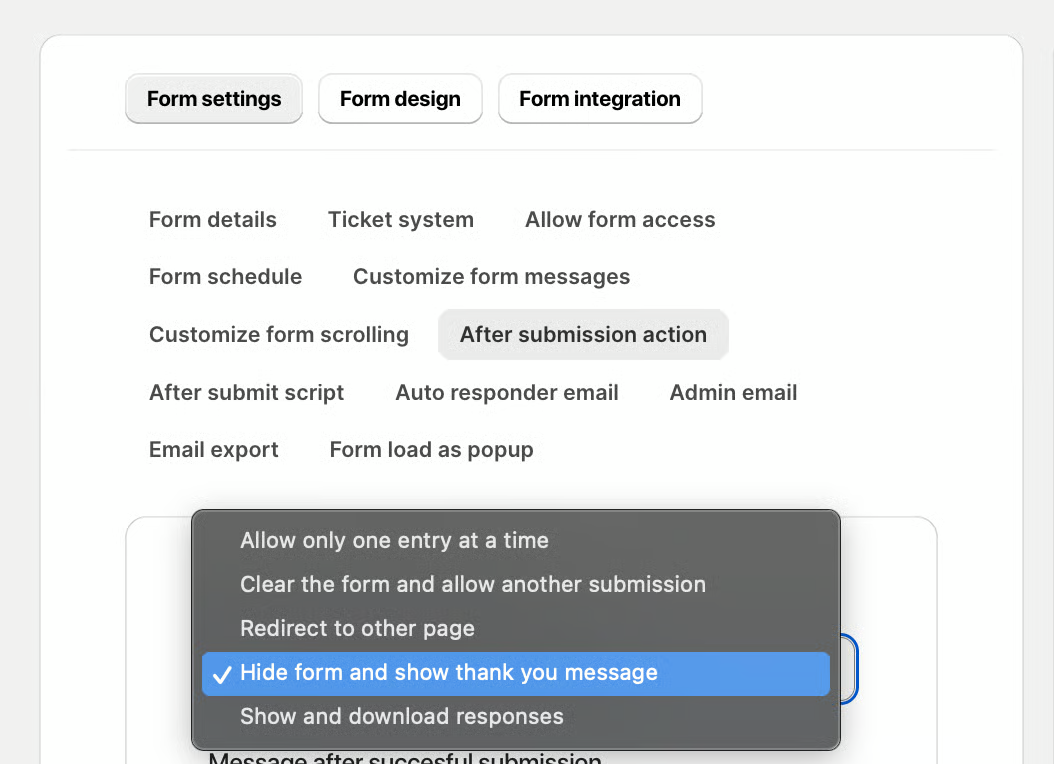
Select your preferred action:
Allow only one entry at a time
Clear the form and allow another submission
Redirect to other page
Hide form and show thank you message
Show and download responses
Save your changes.
Redirect to other page
To redirect to another page is enabled by our app specialists once your store is fully set up. To ensure the security of both our application and your store, as well as to comply with Shopify’s requirements, the following conditions must be met before we can activate this feature:
1. Your store must be live (not password-protected).
2. Your store setup must be fully completed.
3. You must provide us with the Form URL.
4. Share the page URL where the form will be redirected to.
These measures help prevent fraudulent activity and maintain the integrity of your store’s operations.