The Public Wishlist Count allows you to display how many people have wishlisted specific products. This feature acts as excellent social proof to show that a product is popular, which induces more customers to save the item and can bring your store more sales.
Where the Counter Can Be Displayed
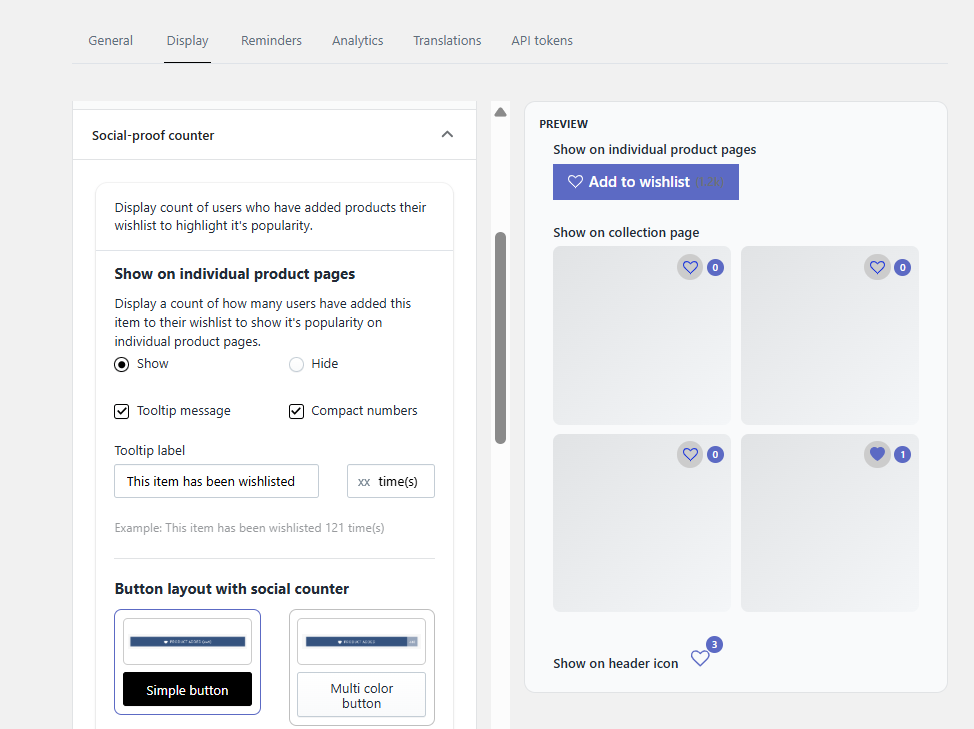
You have full freedom to mix and match where you want the counter to appear:
Product Page
Collection Page
- Header Icon
How to Enable the Wishlist Count
To choose your display locations and activate the counter, follow these steps in the app backend:
Navigate to Settings.
Click on Display.
Select Social Proof Counter.
Choose your preferred sections (Product Page, Collection Page, or Header Icon).
Enable the “Show” option for each selected section.
Was this article helpful?
That’s Great!
Thank you for your feedback
Sorry! We couldn't be helpful
Thank you for your feedback
Feedback sent
We appreciate your effort and will try to fix the article